Photography Flyer: A Professional Template for Business Growth
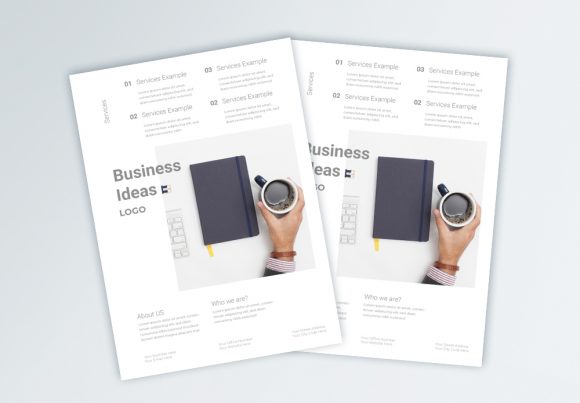
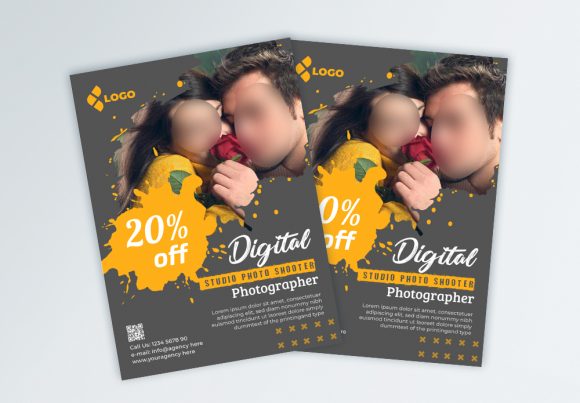
In the competitive world of marketing, a tangible, well-designed piece of print media still carries significant weight. While digital ads scroll by, a physical flyer can linger on a desk or in a bag, serving as a persistent reminder of your services. This is particularly true in the visual arts and service industries, where the quality of your marketing materials reflects the quality of your work. The Photography Flyer is a professional, fresh, and clean flyer template designed specifically for this purpose. It is not merely a collection of shapes and text boxes; it is a structured layout system intended to help photographers, creatives, and small business owners promote their services effectively.
The core appeal of this template lies in its versatility and professional finish. Available in the standard A4 size, it fits perfectly into standard display racks, mailers, and hand-out scenarios. However, the design extends slightly beyond the trim line with a 0.25-inch bleed, ensuring that your background colors and images reach the very edge of the paper after cutting. This attention to print specifications is critical. When you hand a potential client a flyer with unprinted white edges, it looks accidental; when you hand them a full-bleed, high-resolution print, it looks intentional and polished. The Photography Flyer template removes the technical guesswork, allowing you to focus on the creative message.
Visual Hierarchy and Modern Design Aesthetics
Effective editorial design relies on the ability to guide the viewer's eye. The Photography Flyer achieves this through a clean layout that prioritizes whitespace and structure. In the realm of modern typography, clutter is the enemy of clarity. This template utilizes a grid system that balances text and imagery, ensuring that your contact information, services list, and portfolio samples do not compete with one another for attention. The visual personality of the design is sharp and contemporary, making it suitable for a wide range of branding styles—from minimalist corporate photography to vibrant family portraiture.
The aesthetic is intentionally neutral enough to adapt but distinct enough to stand out. It avoids trendy design elements that might look dated in six months, opting instead for a timeless structure. This makes the Photography Flyer an excellent design asset for building a consistent brand identity. Whether you are a freelance photographer looking to hand out leave-behinds at networking events, or a small business owner creating a direct mail campaign, the visual hierarchy ensures that the most important information—your value proposition—is communicated immediately.
Technical Specifications for Flawless Output
One of the most common pain points in DIY design is the gap between screen and print. Colors that look vibrant on a monitor often appear dull on paper if the wrong color profile is used. The Photography Flyer is set up in CMYK Color mode, the industry standard for commercial printing. This ensures that the colors you choose in the file will be reproduced accurately by professional printers. Furthermore, the file is set to 300dpi resolution. This high resolution is non-negotiable for professional print media; it ensures that text is crisp and images are sharp, avoiding the pixelation that plagues low-quality flyers.
Compatibility is another key feature. The template is provided in Adobe Illustrator (AI) and EPS file formats. These vector-based formats are superior for this type of work because they allow for infinite scalability without loss of quality. Unlike a raster image (like a JPEG), a vector flyer can be resized if you decide to print it as a poster later. The file is fully editable and layered, meaning you have granular control over every element. You can isolate a background layer, adjust a specific text block, or swap out a graphic element without disturbing the rest of the design.
Ease of Customization and Typography
For many entrepreneurs and content creators, the barrier to entry for professional design is often the software learning curve. The Photography Flyer addresses this by utilizing industry-standard design techniques that simplify the editing process. The layout is organized logically, with layers clearly named to help you navigate the file quickly. You don't need to be a senior graphic designer to make this template work for you; the structure is intuitive enough for a beginner but robust enough for a seasoned professional.
Typography is a critical component of any print design. This template utilizes Google Fonts, which are high-quality, open-source typefaces. This is a practical choice for a business flyer template because it eliminates licensing headaches while providing access to a vast library of premium font styles. Whether you need a clean sans serif font for body copy or a bold display font for headlines, the Google Fonts library has you covered. The instructions included in the file make it easy to swap out fonts. By pressing "T" to activate the text tool, you can click on any text block and replace the placeholder content with your own messaging.
Practical Applications and Use Cases
The utility of the Photography Flyer extends beyond the photography industry. Because of its clean and professional aesthetic, it serves as a versatile marketing asset for various sectors. Here are a few practical scenarios where this template excels:
- Service Promotion: Use the flyer to outline a specific package, such as a "Summer Mini-Session" or a "Business Starter Kit." The layout allows for clear pricing and deliverables.
- Event Marketing: If you are hosting a workshop, gallery opening, or pop-up shop, the A4 format provides enough space for date, time, location, and a brief description without feeling cramped.
- Portfolio Showcase: For creatives, the flyer can serve as a mini-portfolio. The layout accommodates image placeholders where you can feature your best work, acting as a visual hook for potential clients.
- Brand Launch: When launching a new brand or service, a physical flyer can complement your digital social media graphics. Handing out a tangible piece of media during a launch event adds a layer of legitimacy and permanence.
It is also worth noting the importance of the included Help File. While the editing process is straightforward, the help file provides a safety net. It details the steps for changing text and images, ensuring that you don't accidentally break the layout structure. This guidance is particularly helpful for those who may be using Adobe Illustrator for the first time or who are unfamiliar with vector file management.
Design Recommendations for Maximum Impact
To get the most out of this creative font and template combination, consider a few design best practices. First, maintain visual consistency. If your brand uses specific colors, input those exact hex or CMYK codes into the template to ensure alignment with your brand identity. Second, pay attention to font pairing. While the template comes with suggested fonts, feel free to experiment. A common technique is to pair a bold, geometric sans serif font for headers with a more traditional serif font for body text to create a clear distinction between sections.
Finally, remember the purpose of the flyer: it is a call to action. Ensure your contact information—website, phone number, email, and social media handles—is prominent. The clean layout of the Photography Flyer is designed to highlight these details, but they must be placed strategically. By leveraging the high-resolution capabilities and the easy-to-edit nature of this template, you can produce a marketing piece that feels custom-made for your business, helping you stand out in a crowded market.